
NODO FINANZAS · YOUR PERSONAL SPACE

Your money,
made clearer.

See where it goes, bring your account transactions together and track a savings goal. All in a view you can understand and keep up with.

For your personal finances. If you work for yourself, there is a separate space for your business activity too.

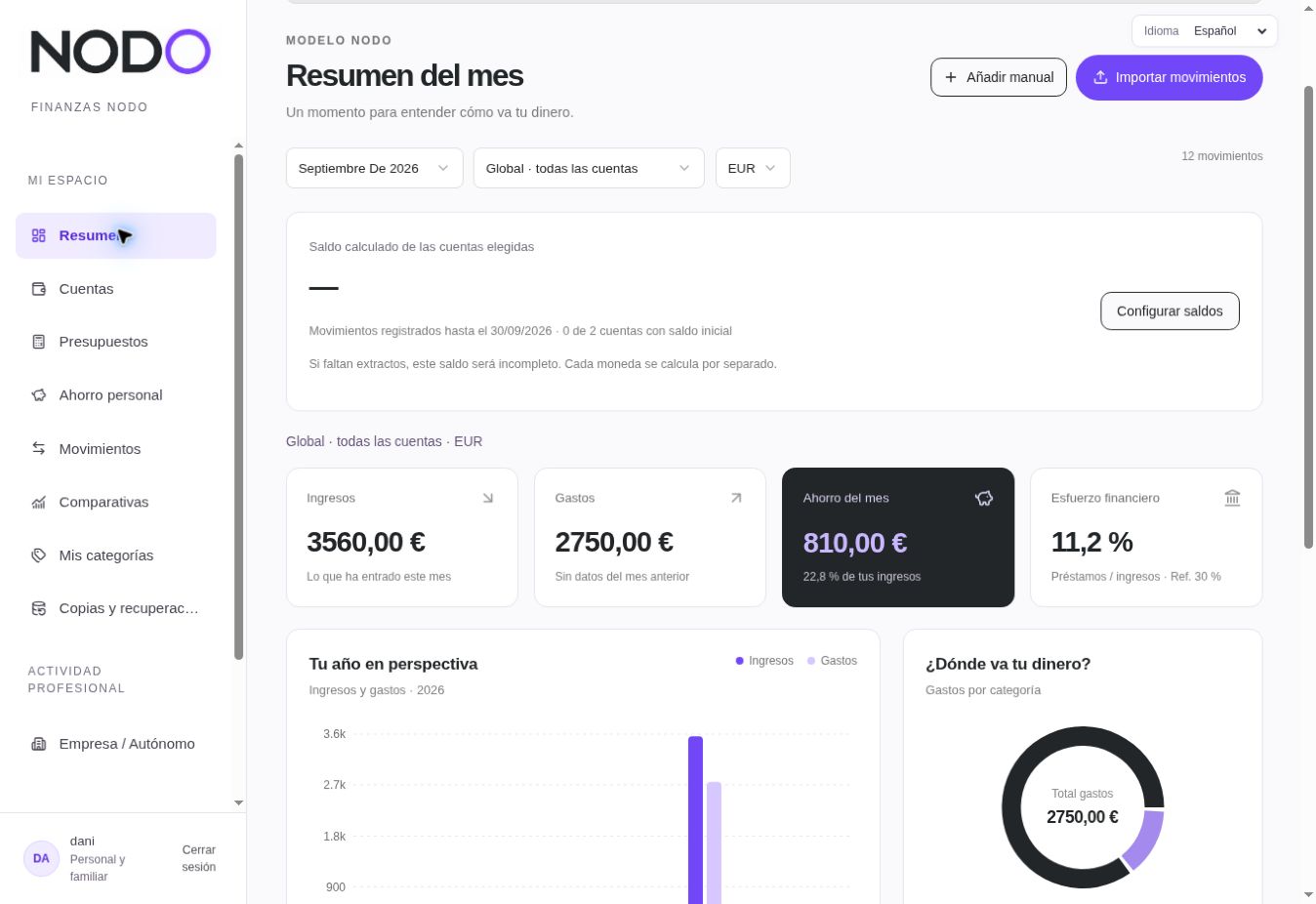
NODO Finanzas overview showing income, expenses and savings in the current Spanish interface
The actual software interface in Spanish, shown with sample data.
A clearer view of your money, at your pace.Scroll to explore

YOUR PRIVACY

Your finances are personal.
Your space should be too.

In NODO, other users cannot see your transactions. We do not sell your financial information, and we treat it confidentially.

Read the privacy policy

01 / WHAT CHANGES

Three answers you'll
want close at hand.

Understand what is happening with your money and what to look at next.

01 / SPENDING

Where does my money go?

Review transactions by category and spot the expenses that make the biggest difference each month.

By category
Essentials
Leisure
Other
Illustrative example · Your totals depend on your transactions
02 / ACCOUNTS

How are we doing at home?

Look at one account, one person or your whole personal space. Switch views while keeping the full picture.

03 / SAVINGS

Am I moving towards my goal?

Set a savings target and compare what comes in with what goes out each month.

SAVINGS GOAL20%
A target you can adjust

02 / GETTING STARTED

From a bank statement
to a clearer picture.

Your data goes in when you import it. NODO helps you check your transactions and understand the result.

See the screens
  1. 01

    Create your space

    Set up the people and accounts you want to view.

  2. 02

    Import transactions

    Upload a CSV or Excel bank statement and check the data before saving it.

  3. 03

    Review categories

    Classify transactions and adjust categories to fit your life.

  4. 04

    Choose your goal

    Track your savings and compare months to see your progress.

03 / INSIDE THE SOFTWARE

Take a look
before you open it.

These are real screenshots of NODO Finanzas with sample data. The current product interface is in Spanish. Enlarge them to see the details.

NODO Finanzas monthly overview with income, expenses and savings in Spanish
Income, expenses and savings in one view. Scroll to explore.

A clear personal view. A separate space for business activity if you need it.

Open NODO Finanzas

IF YOU WORK FOR YOURSELF

Your business has
its own space.

Import business transactions, enter your monthly invoicing total and review money received, expenses and cash flow. Your personal finances stay in their own space.

Explore the software

THE ESSENTIALS

Before you begin.

Do I need to be self-employed or run a company?

No. You can use the personal space to organize your own finances. The business activity space is there if you also work for yourself.

Does it connect to my bank automatically?

Not yet. You import transactions from a CSV or Excel file and can review and classify them before using the data.

Are personal and business finances combined?

No. They are separate spaces. NODO does not yet show an automatic combined balance.

Can I issue invoices or file taxes here?

No. You can enter monthly invoicing totals to compare your business figures, but NODO Finanzas does not issue invoices or replace accounting software.

04 / PRICING

Choose your pace.

Monthly or yearly access to NODO Finanzas. Choose a currency to see the exact price for each billing period.

Show prices in
MONTHLY BILLING

Month to month

US$5.90per month

The flexibility to pay monthly.

Prices in US dollars (USD).

Start my trial

NODO FINANZAS

Put your numbers
in perspective.

Start with your personal space. Explore how your transactions are organized and what you can learn from them.

Explore the software

NODO · Monthly overview

Scroll the image to see the details.

NODO Finanzas monthly overview in Spanish